

A power bank RFQ with a missing field invites a substitute you did not approve or leaves nobody responsible for battery transport after handoff. Write one model per line with capacity, output, ports, quantity, allowed substitutes, documents by purpose and the handoff point; "Anker power bank, 100 pieces" is not enough to quote.
This guide is for buyers preparing a wholesale power bank request. It uses the published A110A, A1654 and A1664 model pages as examples; the RFQ table near the end can be copied as it is.
Power bank RFQ inputs at a glance
| Input or item | Typical value or source | Why it matters |
|---|---|---|
| Exact model | A110A, A1654, A1664 have published pages; others: printed model | Separates look-alike capacities and versions. |
| Capacity and output | A110A 26,250mAh / 300W total; A1654 and A1664 10,000mAh | Defines what a substitute must keep. |
| Ports and format | A110A 2 × USB-C + 1 × USB-A; A1654 and A1664 1 × USB-C, magnetic | A1654 has a display and stand; A1664 is slimmer. |
| Quantity | Devices: 10 units in total, no per-SKU minimum; order above US$2,000 | Published starting terms on /pricing. |
| Allowed substitution | Buyer input | Stops a similar model replacing yours. |
| Documents by purpose | Buyer input, per model line | A family-level file may not cover the exact reference. |
| Handoff and transport | Mainland China or Hong Kong address, or UPS/DHL pickup | The buyer arranges onward battery transport unless the quote says otherwise. |
Start with the model requirement#
Use the exact model reference when you have it. A series name and a product photo are useful clues, but neither one confirms the regional version or full specification.
If the model is still open, describe the intended use. Prime may be part of a higher-output assortment. PowerCore can cover everyday replenishment, while Nano and MagGo can fit compact or magnetic requirements. These descriptions narrow the search without pretending that every product in a family is interchangeable.
For every requested line, include:
- Capacity and minimum output wattage
- Required ports or integrated cable
- Preferred color and acceptable alternatives
- Quantity per model
- Destination market
The Anker power bank wholesale page explains the product families and current order boundary. Use it to prepare the list, then put the exact requirement in the RFQ.

A product image can help identify the family. The written line still needs the capacity, output, connectors and quantity.
Put one product on each line#
Do not combine several models into a sentence. Give each requested item its own line, even when the products belong to the same series. This makes it possible to check the proposed model and quantity without searching through an email thread.
A useful line can follow this order:
- Exact model, or series if the model is not fixed
- Capacity and minimum output
- Port layout, integrated cable or magnetic requirement
- Preferred color and allowed alternatives
- Quantity and destination market
Packaging and labeling can sit on the same line when they differ by product. If the requirements apply to the whole order, put them in a separate commercial section instead.
Separate confirmed facts from open questions#
An RFQ is easier to answer when it shows what is fixed and what still needs a recommendation. Mark the exact model, capacity or connector requirement as confirmed. Put uncertain details in a separate question column. For example, the buyer may have fixed the 20,000 mAh capacity but still need advice on the output needed for a particular laptop.
This distinction prevents a supplier suggestion from silently becoming an order requirement. It also gives the buyer a clean way to review the reply. A proposed color can be accepted without reopening the capacity, quantity or handoff plan.
Use simple labels such as "required," "preferred" and "open." Avoid labels such as "standard" or "normal" because they do not tell the reader which version is expected. If a preference affects the buying decision, write the condition itself rather than relying on the label.
When several people review the order, name one person who can approve substitutions. Otherwise, a warehouse buyer may accept a color change while the sales team still expects the original finish. The RFQ should record the final decision so the quotation does not depend on a message that only one person saw.
State how the order will move#
Power banks contain batteries, so the handoff and onward transport plan belongs in the first request. State where the goods will change hands and who will take responsibility after that point.
The published route is delivery to a nominated address in mainland China or Hong Kong, or buyer-arranged UPS or DHL collection from the warehouse. Onward export is not included unless the signed quotation says otherwise.
The buyer should identify destination documents or labeling requirements as well. A category page cannot prove destination-country approval. The quotation and supporting documents must state what is available for the proposed order.
Treat battery logistics as part of the product line#
Battery handling should not appear as a note added after the models have been selected. It affects how the buyer plans collection, onward transport and the documents to request. Add a transport field to every power bank line, even if several lines will use the same route.
Start by naming the physical handoff point. Then state whether the buyer will arrange UPS or DHL collection, use another approved logistics provider, or receive the goods at a nominated address under the quoted terms. Do not write only "ship to Europe" or "deliver to our warehouse." Those phrases skip the point where responsibility changes hands.
Next, record the destination market and the party responsible for checking destination requirements. A seller may be able to provide product or shipment documents for the quoted goods, but the website cannot decide whether those documents satisfy a particular carrier, customs authority or marketplace. Ask the relevant party before payment, while the model list can still be changed.
Packaging also belongs in this review. If retail boxes must remain unopened, if outer cartons need a reference label, or if the buyer has a carton-mark requirement, put it in the RFQ. The final quotation should say whether that request is included, still open or unavailable.
Make substitutions explicit#
Stock changes, so the RFQ should say what may change. "Alternative color accepted" is clear. "Similar model accepted" is not, because similarity can hide a different capacity, output or connector layout.
Write the limits in plain language. You may accept another color while keeping the same capacity and output. You may accept a related model but require the same ports. If nothing can change, mark the line as exact model only.

Compact, integrated-cable and magnetic products should be listed by their own requirements instead of being grouped under one broad label.
Use the A110A Anker Prime 26K 300W, A1654 Anker MagGo 10K and A1664 Anker MagGo Slim 10K model pages as exact-reference examples. Their published facts help prepare an RFQ, but availability, batch and regional version still require a current quotation.
Ask for documents by purpose#
"Send all certificates" sounds thorough, but it gives the supplier no way to tell which document matters. Name the purpose instead. A buyer may need to verify the model and regional version, prepare carrier approval, check a marketplace listing or support an internal purchasing file. Each purpose can call for a different document.
Write the request beside the relevant model. If one document is meant to cover several lines, ask the supplier to identify those lines. Similar family names do not prove that the same report or declaration applies to every capacity and regional reference.
When a document is provided, compare its model name with the quotation. Check the revision or issue date when one is shown, and confirm that the document belongs to the product being offered. If the match is unclear, keep the point open instead of assuming that a family-level file covers the exact item.
This review does not replace the buyer's destination or transport checks. It keeps the commercial file organized and makes missing evidence visible before payment.
Include the commercial frame#
Add the target budget, requested delivery window and preferred T/T or L/C terms. Device orders currently start at 10 units without a per-SKU device minimum, while the total order value must exceed US$2,000. The quotation confirms the final quantities, price and lead time.
For a mixed order, list chargers and cables or accessories in their own sections. The pricing and RFQ terms page sets out the current starting quantities and handoff options.
Use a table that survives revisions#
Use one row per product with the columns in a fixed order. The first row shows the published A1664 facts; quantity, color, documents and handoff are left for the buyer.
| Line | Model or open spec | Capacity, output, connectors | Color and packaging | Quantity | Allowed substitution | Documents (purpose) | Handoff and transport | Open question |
|---|---|---|---|---|---|---|---|---|
| PB-01 | A1664 · MagGo 10K Slim | 10,000mAh · 15W wireless · USB-C in/out up to 30W · 1 × USB-C | ||||||
| PB-02 |
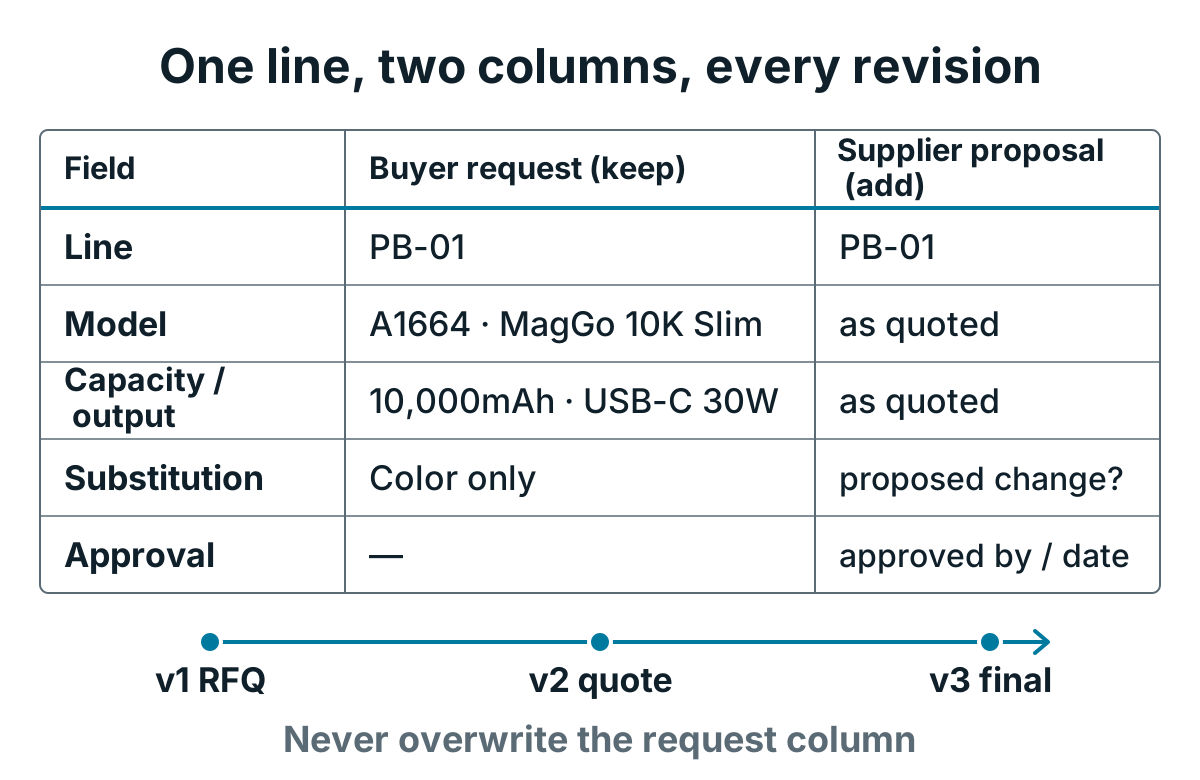
The request column stays as written; each quote version adds its proposal and approval beside it.
Give every row a line number that does not change when a model is replaced. The quotation can then refer to "PB-03" even if the proposed model changes between drafts. This is safer than referring to the third row, which may stop being the third row after someone sorts the spreadsheet.
Keep supplier replies in separate columns rather than overwriting the buyer request. The original specification should remain visible beside the proposed model, quantity and price. A reviewer can then see exactly where the reply matches and where it differs.
Add a date or version number to the file name and to the quotation summary. If the buyer changes a quantity after receiving the first quote, the revised document should show that change. Do not rely on highlighted cells alone because colors can disappear when a file is printed or converted to PDF.
For an order that combines several categories, the mixed-SKU order guide explains how to keep shared commercial terms outside the individual product rows.
Check the reply before payment#
Compare the quotation with the RFQ line by line. Check the seller and invoice issuer, then review the proposed model, regional version, condition, quantity and available supporting documents. Confirm the handoff point and responsibility after handoff in writing.
The About Anker Wholesale page explains the evidence boundary in more detail. A website page is useful for preparing questions, but the signed commercial documents define what is supplied for a specific order.
Finish with a short exception list. Note any requested model that is unavailable, any proposed substitute that still needs approval, and any document or packaging point that remains open. The exception list should match the product table and the latest quotation version.
If the quotation changes a fixed requirement, ask for a corrected draft. A lower quantity, different regional model or changed handoff point should not be accepted through silence. Confirm the final schedule, commercial terms and responsibility boundary in the same document set.
When this guide does not apply#
The example figures belong to the named models only; other Prime, PowerCore or Nano references need their own printed specification. The handoff on the published terms is a nominated address in mainland China or Hong Kong, or buyer-arranged UPS or DHL pickup; onward export, carrier acceptance and destination approval are decided by the buyer and the carrier for the exact model, route and packaging, not by this guide.
Power bank wholesale questions#
Where can I buy wholesale power banks?
Send a model list through this site’s RFQ channel. Devices start at 10 units in total with no per-SKU minimum and the total order value must exceed US$2,000; each line needs model, capacity, output, quantity and handoff city.
What is the difference between Anker and Anker Prime?
Prime is one Anker product family. Its published reference here, A110A, is 26,250mAh with 300W total output; MagGo A1654 and A1664 are 10,000mAh models. Quote by printed model rather than by family name.
Where can I find Anker products for wholesale?
This site takes wholesale RFQs for Anker power banks, chargers and cables. Anker Wholesale is a trading name of GuangZhou Duohuo Technology Co., Ltd, not Anker’s consumer store or corporate purchasing portal; if your policy requires authorized-channel status, request written evidence and verify it before payment.
Is there a fake Anker power bank?
Check before you pay. Anker publishes guidance on verifying authentic Anker products, covering sales channels, security codes where present, purchase records, packaging and serial information. For a wholesale order, check the model reference and packaging against the quotation and request order-specific evidence in the RFQ before payment.
Is a power bank UN3480 or UN3481?
IATA lithium-battery guidance treats a power bank shipped on its own as a lithium-ion battery (UN3480); UN3481 covers batteries packed with or contained in equipment. Confirm the classification for the exact model, packaging and route with the carrier.
Is UN38.3 mandatory?
IATA guidance expects lithium cells and batteries offered for transport to be of a type that meets UN 38.3 testing. Ask for the test documentation for the exact model on each line and let the carrier decide whether it is sufficient for the route.
What to send us
Send these items with your power bank list. The reply covers availability, MOQ, lead time and the questions still open. We reply within 24 hours.
| Item | Why we need it | Example format |
|---|---|---|
| Fixed line number | Keeps references stable across revisions | PB-01 |
| Model | Identifies the exact reference | A1664 |
| Capacity and output | Shows what a substitute must keep | 10,000mAh · USB-C 30W |
| Quantity | Checks the 10-device starting terms | 24 |
| Substitution limits | Stops a similar model replacing yours | Color only |
| Transport responsibility | Names who moves the batteries after handoff | Buyer's forwarder from Hong Kong |
| Documents and purpose | Matches each file to a line | UN 38.3 test summary for carrier review, PB-01 |
| Open questions | Keeps unresolved points visible | Case compatibility, PB-01 |
Primary transport and verification references#
- IATA: lithium-battery transport guidance — primary guidance on identification, packing, marking, labeling, documentation and acceptance considerations for battery transport.
- Anker Support: product authenticity guidance — official guidance on authorized channels, packaging security codes where present, purchase records, product photos and serial information.
Use these references to frame the questions sent to the supplier, carrier and destination reviewer. They do not replace model-specific transport documents or an acceptance decision from the party handling the shipment.
