

A charger quoted with the wrong plug or with shared power misread as per-port power cannot do the job it was bought for. Write the exact model, the wattage needed on the main port, the devices that charge together and the plug version on every RFQ line; a family name such as "Anker Nano" or "Anker Prime" is a starting point, not a quote reference.
This checklist is for buyers preparing a wholesale charger RFQ. It uses the published A2148 Anker 737 GaNPrime 120W charger as the worked example; other Nano, Prime or desktop models need their own printed reference and are not assumed to share its figures.
Charger RFQ inputs at a glance
| Input or item | Typical value or source | Why it matters |
|---|---|---|
| Total output | A2148: 120W (Anker specification) | Shared across ports; not the output of each port. |
| Single-port maximum | A2148: 100W (published single-port maximum) | Compare with the laptop on the main port. |
| Ports | A2148: 2 × USB-C, 1 × USB-A | Count the devices charged at the same time. |
| Plug version | A2148: US foldable, UK/EU fixed | Part of the SKU, so it is set per line. |
| Devices charged together | Buyer input | Lets the quote confirm the allocation. |
| Protocol needs | Buyer input: device model and known protocol | Mark unknowns as a compatibility question. |
| Cable | Buyer input; A80E6 is up to 240W, USB-C to USB-C | A charger quote does not confirm a cable in the box; add one as its own line. |
The Anker charger wholesale page lists the families buyers can request. Use it to choose a direction, then write the exact requirement in the RFQ.
Record wattage and port behavior#
Start with total output and the output expected from each port. For a multi-port model, explain whether one USB-C port must provide the stated wattage or whether shared output is acceptable.
Do not leave the buyer to infer port behavior from the total number printed on the product. Write the output you need from the port that matters. If several devices will charge at once, list that device combination as well.
List the target devices, such as phones, tablets, laptops or shared desktop equipment. Compatibility questions are easier to resolve before a model appears on the quotation.
Describe the charging situation alongside the headline number#
A wattage figure does not explain how the charger will be used. A retail buyer may need a compact single-port unit for phone customers, a multi-port charger for travel kits, or a desktop hub that stays in one place. State the situation beside the electrical requirement.
For a multi-device setup, list which devices are expected to charge at the same time. Do not assume that every port keeps its highest stated output when several ports are active. Ask the supplier to check the proposed model against the simultaneous-use case, then record the answer in the quotation or supporting specification.
If one device is the priority, name it. A buyer might require the laptop port to meet a particular output while accepting slower phone charging on the remaining ports. That is more useful than saying only "three ports required." The number of ports describes the shape of the product, while the use case describes the result the buyer needs.
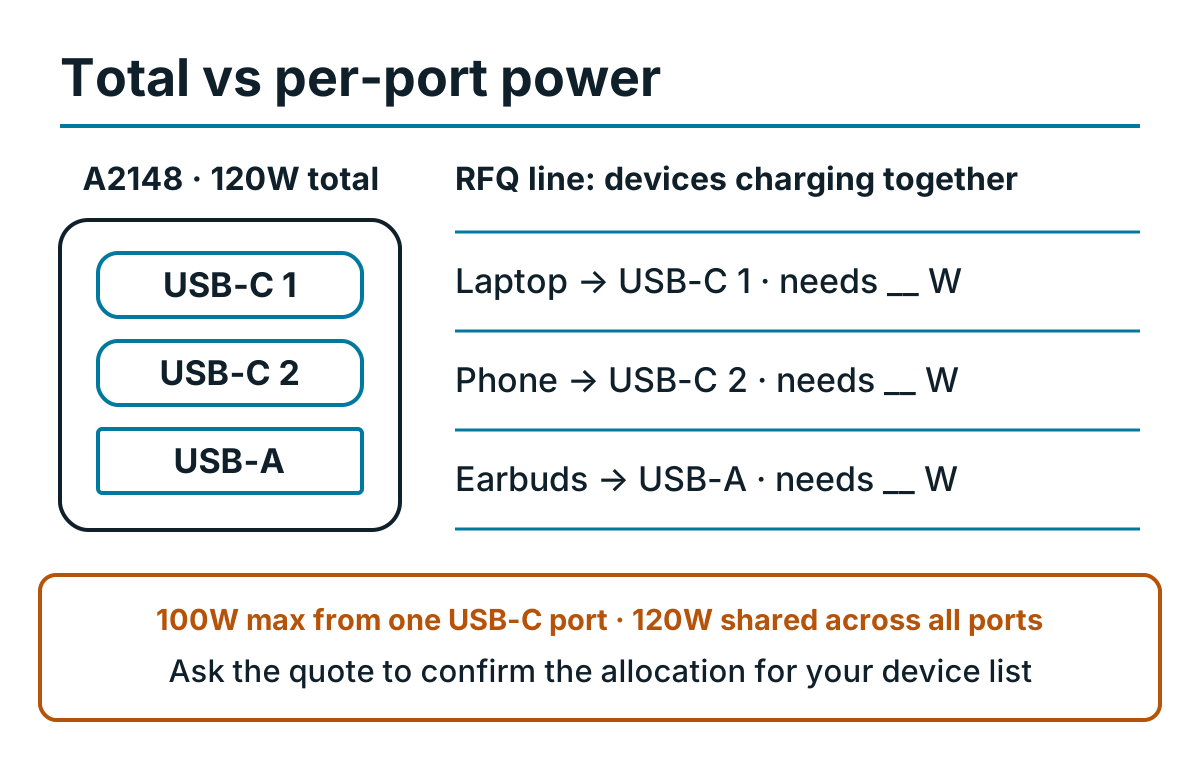
Fill the wattage each device needs on its port; the quote confirms whether A2148 supports that combination. Figures from the published A2148 page.
Keep protocol questions tied to the exact device and charger model. A broad request for "fast charging" can mean different things to different reviewers. Name the target device, required output and any protocol requirement the buyer already knows. If the buyer does not know the protocol, mark it as a compatibility question instead of guessing.

The charger photo shows the format. The RFQ still needs wattage, port layout, plug version and an exact model when available.
Give each charger its own line#
Separate wall chargers and desktop hubs. For each line, record the model or minimum acceptable specification, quantity and allowed substitutions.
A line can follow this order:
- Exact model, or the Nano, Prime, GaNPrime or desktop family
- Total wattage and required output from each port
- Number and type of USB-C or USB-A ports
- Plug version and destination market
- Quantity, color and packaging requirement
This layout also makes substitutions easier to review. Another color may be acceptable while another plug version is not. A lower-output model may look similar in a photo but fail the written requirement.
Keep the family name and model reference in separate fields#
Family names help organize an assortment, but they should not replace the model field. Put Nano, Prime, GaNPrime or desktop hub in a family column, then use another column for the exact proposed reference. This makes it possible to group products for merchandising without losing the technical identity of each charger.
Add a buyer line number that stays fixed through revisions. If the proposed model changes, keep the line number and place the old and new references in separate quote versions. A short change note such as "plug version changed" or "65 W option unavailable" tells the reviewer where to look.
Do not overwrite the original requirement with the supplier's proposal. Keep requested wattage, ports and plug in their own columns. Place proposed wattage, ports and plug beside them. Differences then remain visible even when the substitute belongs to the same product family.
When the model is still open, use a minimum specification rather than a guessed reference. The supplier can propose a current model, and the buyer can compare it with the written minimum before approving it.
Identify the plug version#
The destination market affects the physical plug and may affect the packaged regional version. State the required plug standard and whether another regional version is acceptable.
Do not use an identical product photo as proof that two model references are the same. The quotation should identify the proposed version, and the available supporting documents should match the version being offered.
Check the regional package as a complete item#
The physical plug is only one regional detail. Packaging language, printed ratings, included accessories and the model reference on the box may also matter to the buyer. Ask which packaged version is being quoted rather than approving a loose product photo.
If the order can accept more than one region, list the acceptable versions. Do not write "any plug is fine" when the packaging or resale market still has a restriction. A precise note might accept two plug standards while requiring one packaging language. Another buyer may accept several languages but only one physical plug.
Document requests should name their purpose. The buyer may be checking the regional model, preparing a marketplace file, reviewing electrical compliance or completing internal vendor approval. "All certificates" does not tell the supplier which gap needs to be solved.
Compare the model reference in each supplied document with the quoted product. Check the issue date or revision when shown. If a document covers a family rather than the exact reference, ask whether it applies to the proposed version and keep the answer with the commercial file. The buyer remains responsible for deciding whether the evidence is sufficient for the destination and sales channel.
Separate the assortment by use case#
A buyer may need compact Nano chargers for a small counter, higher-output Prime or GaNPrime units for laptops, and desktop hubs for offices or hospitality. Give each use case a quantity instead of combining everything under "chargers."
If the order also needs power banks, add them as a separate section. Cables and accessories need their own connector, power and length details even when they will be sold with the chargers.

A charger and cable can share one order, but they should not share one vague product description.
Match the cable to the intended charging setup#
A charger quote does not automatically confirm that a cable is included or suitable for the intended output. If the bundle needs a cable, give it a separate line with connector ends, supported power, length, color and quantity.
State whether the cable will be packed separately, paired with a charger for resale, or used only for an internal compatibility check. That detail affects how the buyer reviews packaging and quantities. The charger and cable can share a kit reference, but each product still needs its own model or minimum specification.
For a desktop hub, list any required input cable or power cord separately from the charging ports used by customers. For a wall charger, say whether the buyer expects a cable in the retail package or will source one from the cable and accessory assortment. A product photo should not be used to infer box contents.
When a proposed cable changes, repeat the compatibility check. A different length, connector or power rating may change the intended setup even if the charger itself stays the same.
For a concrete comparison, review the A2148 Anker 737 GaNPrime 120W charger together with the A80E6 Anker 543 USB-C cable. Keep them on separate RFQ lines and confirm the required plug, cable length, packaging and regional version in writing.
Add packaging and handoff requirements#
Include packaging language, barcode or labeling needs, handoff city and requested timing. Current commercial terms use a China or Hong Kong handoff, or buyer-arranged UPS or DHL warehouse pickup. Onward export is not included unless a signed quotation states otherwise.
The pricing and RFQ terms page sets out the published starting quantities, total order threshold and payment options. Final price and lead time follow the exact product list and current availability.
Compare quote versions line by line#
Keep the buyer request and the supplier proposal in separate columns, add a difference column and record who approved each change. The example below uses the published A2148 facts plus assumed request values (EU plug, laptop + phone, quantity 10); supplier columns stay open until the quote arrives.
| Field | Buyer request | Supplier proposal | Difference | Approval status |
|---|---|---|---|---|
| Line | CH-01 | CH-01 | None | — |
| Model | A2148 · 737 GaNPrime 120W | Proposal as received | Record any other reference | Open until named |
| Total / single-port output | 120W / 100W (published A2148 facts) | As stated in the quote | Note any lower figure | Open |
| Ports | 2 × USB-C, 1 × USB-A | As stated in the quote | — | Open |
| Devices charged together | Laptop + phone | Supplier answer on allocation | Note if not supported | Open |
| Plug | EU | As stated in the quote | A different plug is a different SKU | Open |
| Cable | Buyer choice: none in box; add A80E6 line if needed | As stated in the quote | — | Open |
| Quantity | 10 | As stated in the quote | — | Open |
Use the line number, family, exact model, wattage, ports, plug, packaging, quantity, documents, handoff point and open questions as the full column set.
Add a revision date and keep a short change log. A new quote should state whether price, quantity, model, regional version, packaging or timing changed. Do not use cell color as the only change marker because color can disappear in printed copies and PDF exports.
Review the quote in two passes. First check the product facts: model, electrical specification, plug and package. Then check the commercial facts: quantity, unit price, lead time, payment and handoff. Separating the passes makes it less likely that a price change distracts from a technical substitution.
If an unresolved point affects safety, compatibility, regional resale or the handoff plan, keep it open and request a revised quote. If it is only a preference, record who accepted the alternative and when. The final commercial file should not depend on an approval that exists only in chat.
For orders that combine several product groups, use the mixed-SKU order guide to keep shared commercial terms separate from the charger lines.
Use a final pre-quote check#
Before sending the RFQ, verify that it contains:
- Exact model or required wattage and port layout
- Plug version and destination market
- Quantity per model
- Acceptable substitutions
- Packaging, payment and handoff requirements
When the quotation comes back, compare it with this list. Check the legal seller and invoice issuer, proposed regional version, condition, quantity and handoff point before payment. The About Anker Wholesale page explains which facts must come from the quotation and supporting documents rather than the website.
Finish with an exception list. It should name any unavailable model, substitute still waiting for approval, document that has not arrived, or packaging point that remains unclear. Match each exception to its buyer line number.
The last review should use the final quotation, not an earlier spreadsheet attachment. Confirm that every accepted change appears in that version and that superseded drafts are clearly marked. Once the model schedule and commercial terms agree, the buyer has a clean record for payment and later receiving checks.
When this checklist does not apply#
The A2148 figures describe that one model. Nano chargers, other GaNPrime wattages and desktop hubs need their own published or printed specification. The checklist organizes the request; it does not decide whether a document satisfies a destination regulator, marketplace or carrier, and it does not replace the quotation.
Charger wholesale questions#
Can I use a 120W charger on my phone?
A2148 is rated 120W in total and 100W from one USB-C port. Under USB Power Delivery the charger and the device agree on a power level, so the total rating is a ceiling, not what every device draws. Put the phone model on the RFQ line so compatibility is checked for the quoted charger.
Is 120 watt a fast charger?
120W is the A2148 total across three ports. How fast a device charges depends on the device and the port it uses, so state the wattage needed on the main USB-C port rather than relying on the headline number.
Where can I find Anker products for wholesale?
This site takes RFQs for Anker chargers, power banks and cables. Anker Wholesale is a trading name of GuangZhou Duohuo Technology Co., Ltd, not the Anker consumer store; if your procurement policy needs authorized-channel status, request written evidence and verify it before payment.
Where can I find distributors for Anker products?
Anker’s authenticity guidance points buyers to authorized sales channels. This site is an RFQ channel operated by GuangZhou Duohuo Technology Co., Ltd, and the domain name does not establish authorized-channel status. If you need an authorized distributor, ask for written authorization and verify it independently before payment.
Where can I buy portable chargers in bulk?
Send a model list through the RFQ channel. Chargers, power banks and hubs start at 10 units in total with no per-SKU device minimum, and the total order value must exceed US$2,000.
Is there an Anker charger wholesale price list?
No unit prices are published. Price depends on the exact regional model, quantity, packaging and handoff terms and is given in the written quotation for your list.
What to send us
Send these items for each charger line. The reply covers model fit, MOQ, lead time and the questions still open. We reply within 24 hours.
| Item | Why we need it | Example format |
|---|---|---|
| Model | Separates A2148 from other GaNPrime or Nano chargers | A2148 |
| Target devices and simultaneous use | Lets the reply check the port allocation | MacBook + phone at once |
| Primary-port minimum | Defines the output that cannot drop | USB-C 1: 100W |
| Plug version | Plug is part of the SKU | UK |
| Cable | Cable lines are quoted separately | A80E6 6 ft × 20, or none |
| Quantity | Checks the 10-device starting terms | 10 |
| Packaging | Language and labels change the request | English box, EAN on carton |
Primary technical and verification references#
- USB-IF: USB Power Delivery — primary background for USB PD power levels, protocol behavior and compliance terminology.
- Anker Support: product authenticity guidance — official guidance on authorized channels, packaging security codes where present, purchase records, product photos and serial information.
These references explain the verification method; they do not confirm that a particular quoted model, document or regional version is acceptable for the buyer's market. Match every source and supporting file to the exact product line before payment.
